Set Up a Trigger
Triggers are used to define rules that trigger actions when certain conditions are met.
Written By Evolo Support
Last updated About 2 months ago
Here's how to do it
Go to Settings and select Apps.
Click Add Application.
Enter a name, a description if desired, and select a gateway.
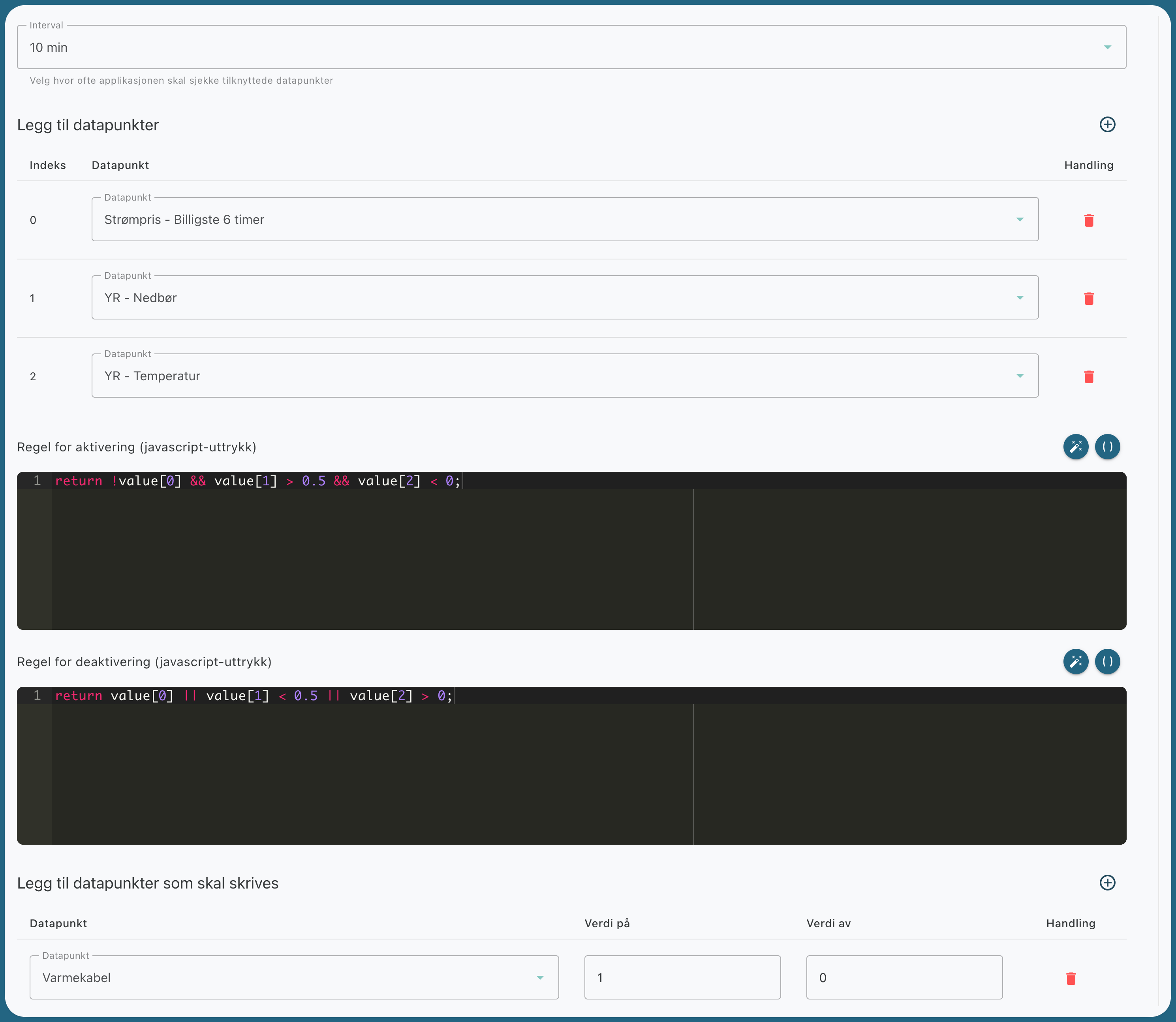
Select the interval for how often the application should evaluate the data points.
Select the data points to be used in the trigger.
Enter the activation rule.
Enter the rule for deactivation.
Select which data points to write to and which values to use.
Click Create.
Activation and Deactivation Rules
Activation and deactivation rules are written as JavaScript expressions.
If both rules are true at the same time, the activation rule takes precedence.
Interval and Indices
The data points you add are assigned an index in the same order as they appear in the list. These are used in the JavaScript expressions, for example, value[0], value[1], and value[2]. The trigger evaluates the rules using the selected interval.
Example
In this example, the gateway turns on outdoor heating cables when these conditions are met:
the electricity price is not among the 6 most expensive
expected precipitation is greater than 0.5
the expected outdoor temperature is less than 0
Still need help? Ask the team